Planning to participate in the OLL × TechFest Robotics Championship at IIT Bombay, but not sure how to build a RoboSumo robot?
Want to build your RoboSumo without sourcing every component separately? Get the official RoboSumo Competition Kit from OLL here → Purchase the Kit
Finding a complete tutorial that covers everything—from selecting the right components to assembling, wiring, programming, and testing the robot—can be challenging.
In this guide, Pratyoosh, a RoboSumo winner from NL Dalmia High School, shares a complete, practical walkthrough of how to build a RoboSumo robot for robotics competitions.
The guide covers the major components required, how they fit together, how the motor drivers and ESP32 are connected, and how to test the completed robot before taking it to the competition arena.
Whether you’re participating in RoboSumo for the first time or looking to understand the fundamentals of building a competition-ready robot, this guide provides a step-by-step starting point.
Important: This build is intended as a reference project. Always check the latest official RoboSumo competition rules for permitted dimensions, weight, components, construction, and safety requirements before building your competition robot.
What Is OLL × TechFest IIT Bombay?
OLL × TechFest 2026–27 is a national robotics championship that gives school students an opportunity to build, compete, innovate, and showcase their robotics skills on a larger platform.
The championship features three competition tracks:
🤖 RoboSumo — 1v1 robot battle
🏎️ RoboRacer — High-speed robot racing
💡 Robotics Innovation Challenge — Build an original robotic or automated solution to a real-world problem
The competition is designed for school students from Grades 4–12, with teams progressing through qualification rounds depending on the track.
For RoboSumo and RoboRacer, the journey includes:
National Online Qualifier → Regional Qualifier → Grand Finale at IIT Bombay
For the Robotics Innovation Challenge:
Online Round 1 → Grand Finale at IIT Bombay
The Grand Finale is scheduled at IIT Bombay from 16–18 December 2026, giving qualifying teams the opportunity to take their ideas and robots to one of India’s leading technology institutions.
With a ₹1.5 lakh prize pool, FREE participation, and multiple competition formats, OLL × TechFest provides students with a platform to put their engineering, problem-solving, creativity, teamwork, and robotics skills to the test.
What Is a RoboSumo Robot?
RoboSumo is a robot-versus-robot competition where the objective is to use your robot to push the opponent out of the designated arena.
This makes several factors important while designing the robot, including:
Motor torque
Wheel traction
Robot weight
Ground clearance
Chassis design
Wedge angle
Power delivery
Motor control
Overall stability
A good RoboSumo robot isn’t just about having powerful motors. The mechanical design, electronics, wiring, and programming all have to work together.
Components Required to Build a RoboSumo Robot
Before starting the build, you’ll need the following components:
Component Purpose
Robot chassis - Main body of the robot
Stainless-steel wedge - Helps the robot get underneath the opponent
3S LiPo battery - Main power source
LiPo battery charger - Charging the battery
BTS7960 motor drivers ×2 - Controls the motors
300 RPM Johnson motors ×2 - Drives the robot
ESP32-S3 / ESP32-C3 - Main control unit
Rubber wheels - Provides traction
XT60 connectors - Battery connection
Shaft enclosures - Connects wheels and motors
Wires - Electrical connections
LM2596 step-down module - Steps down the battery voltage
Soldering iron - Soldering connections
Screwdriver set - Mechanical assembly
Multimeter - Checking voltage and connections
Heat-shrink tubing - Insulating electrical connections
Capacitor - Helps reduce voltage fluctuations
U-clamps - Mounting the motors
Get the Official RoboSumo Competition Kit
Want to build your RoboSumo robot without having to source every component separately?
Get the official RoboSumo Competition Kit from OLL, with the essential components required to start building your competition robot.
The kit is designed to make the building process simpler for students, teachers, and robotics teams preparing for the OLL × TechFest Robotics Championship 2026–27.
What’s included?
The kit includes the key components required for the RoboSumo build, allowing participants to spend less time sourcing components and more time building, testing, and improving their robot.
Ready to start building?
👉 Purchase the Official RoboSumo Competition Kit:
https://oll.co/shop/product/robo-sumo-kit-specially-for-techfest-iit-bombay-22b5228a
Note: The kit is intended to support the RoboSumo build process. Participants should always ensure that their final robot complies with the latest official competition rules and regulations.
Resources for the RoboSumo Build
To make the building process easier, all the resources used in this guide are available for reference and use during the build.
You can access:
ESP32 Code
3D Printable STL Files
Motor Driver Bracket Files
Other Build Resources
Access All Resources: https://drive.google.com/drive/folders/1M_8ZRMyDigl5VaabcrEx95enAyfIjCNw?usp=drive_link
🎥 Watch the Complete RoboSumo Tutorial
Prefer watching the build instead of reading through the steps?
Watch the complete step-by-step RoboSumo robot building tutorial on YouTube.
👉 Watch the RoboSumo Tutorial on YouTube →
The video covers the complete process, including components, chassis design, motor installation, wiring, ESP32 programming, testing, and final setup.
Step 1: Building the Robot Chassis
The chassis forms the main structure of the RoboSumo robot.
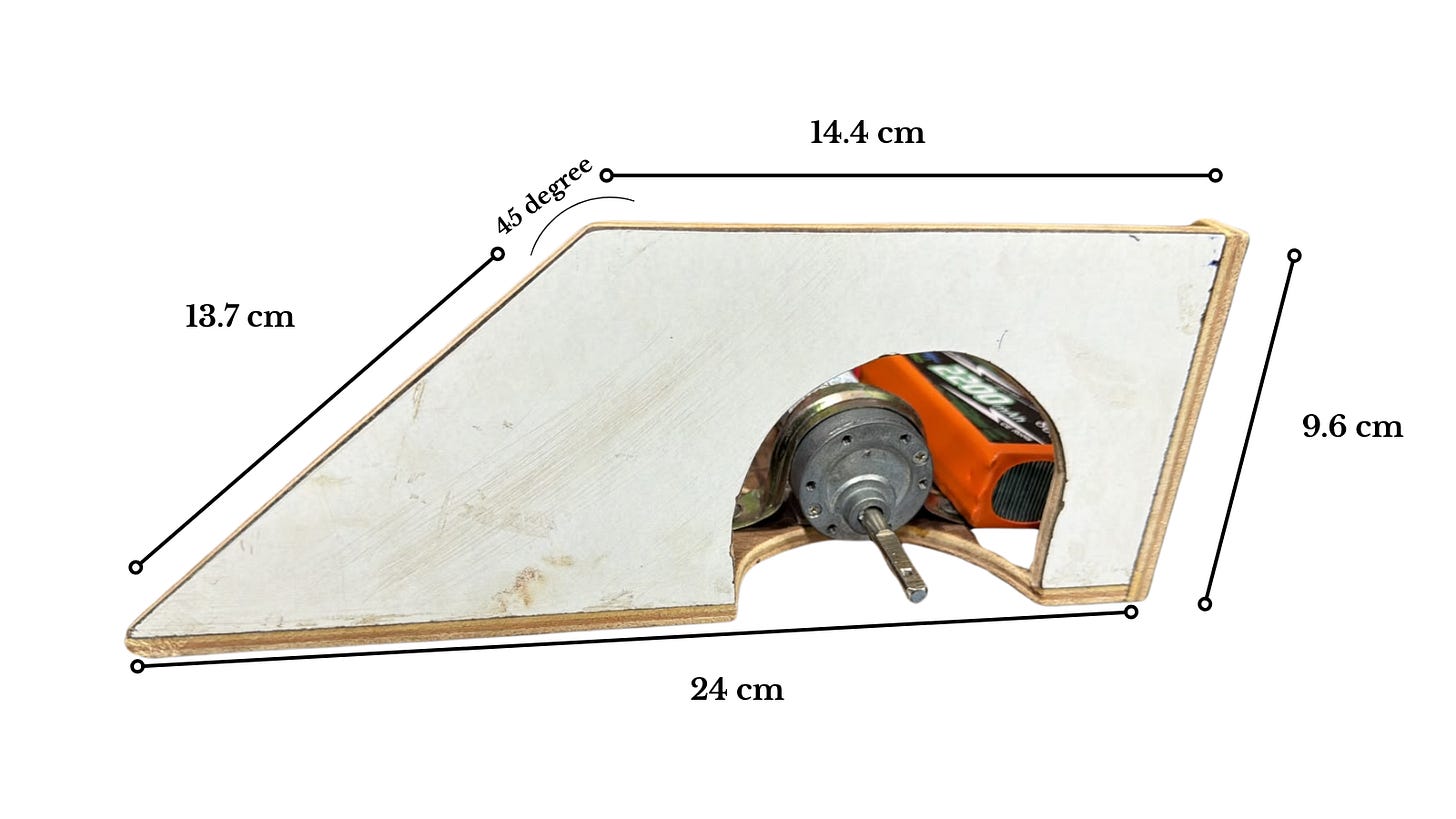
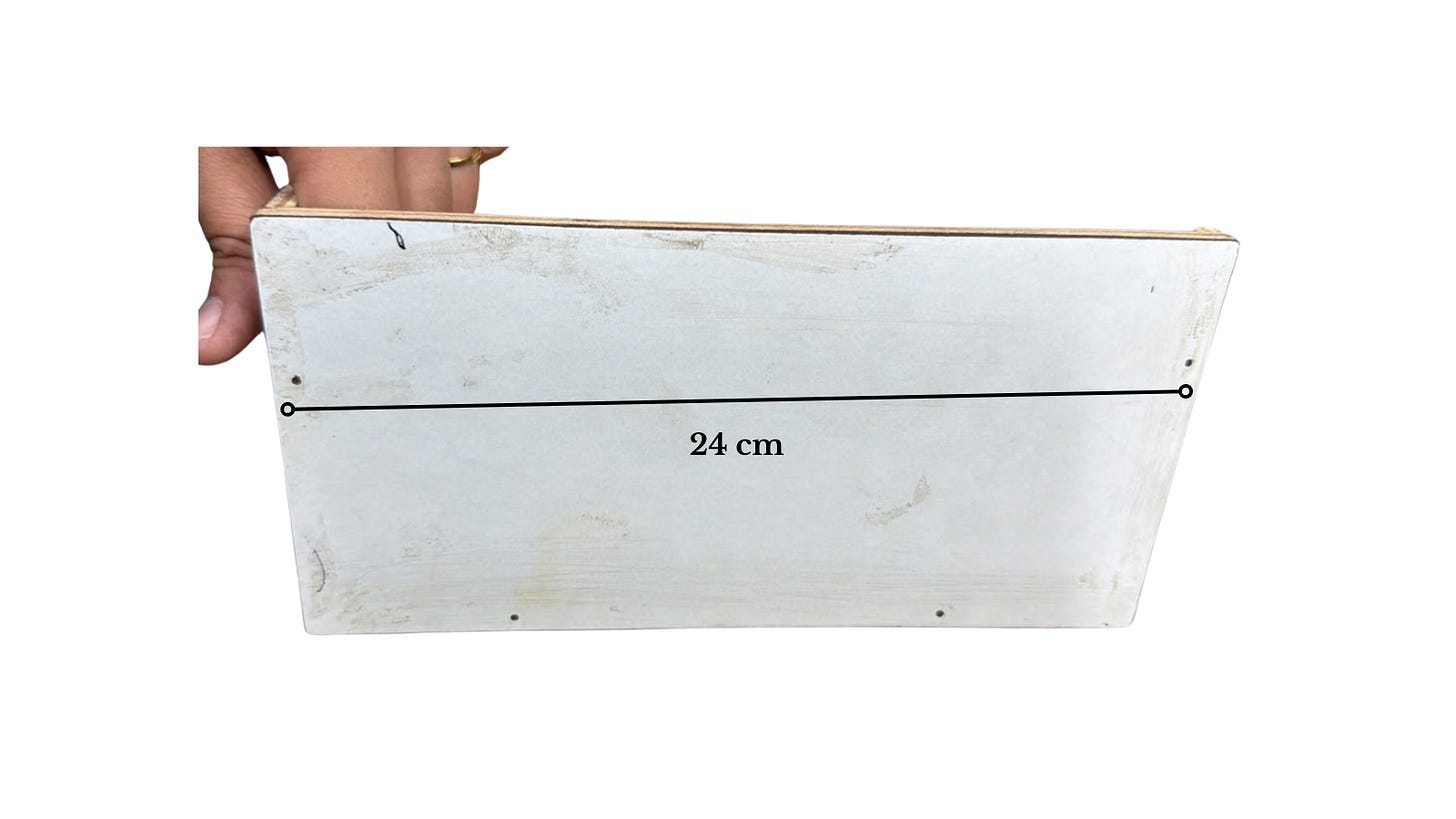
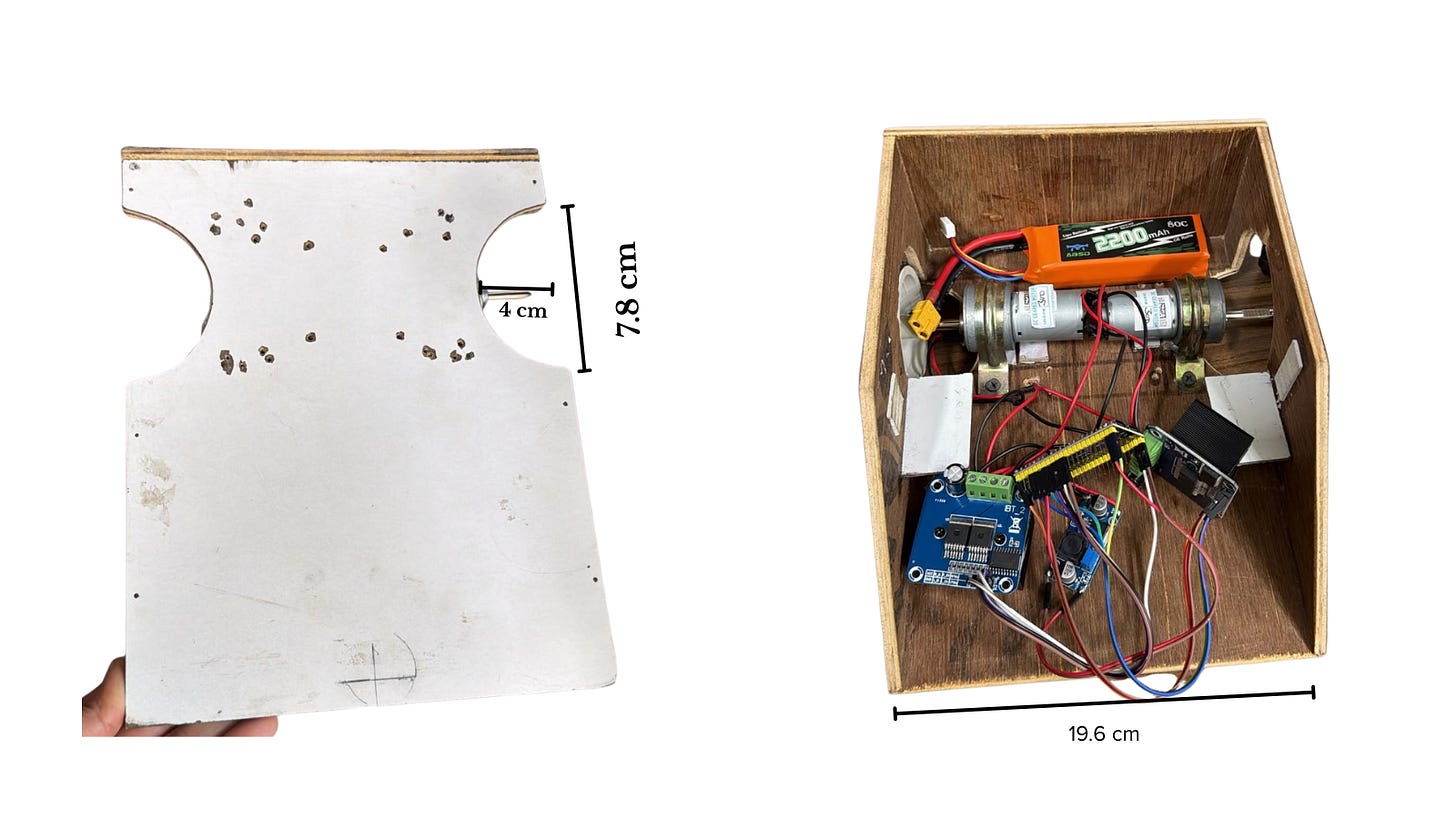
For this build, the main chassis is made from wood, while the front wedge is made from stainless steel.
The chassis has two cutouts for mounting the motors and wheels. The front section has a sloped design that allows the robot to get underneath the opponent.
The dimensions of the chassis used in this build are approximately:
Length: 24 cm
Width: 19 cm
Height: 9 cm
The wheel openings have a radius of approximately 5 cm.
The chassis also includes mounts that are approximately 5 cm wide, which are used to mount the motor drivers.
Step 2: Designing the RoboSumo Wedge
The wedge is one of the most important mechanical elements of the robot.
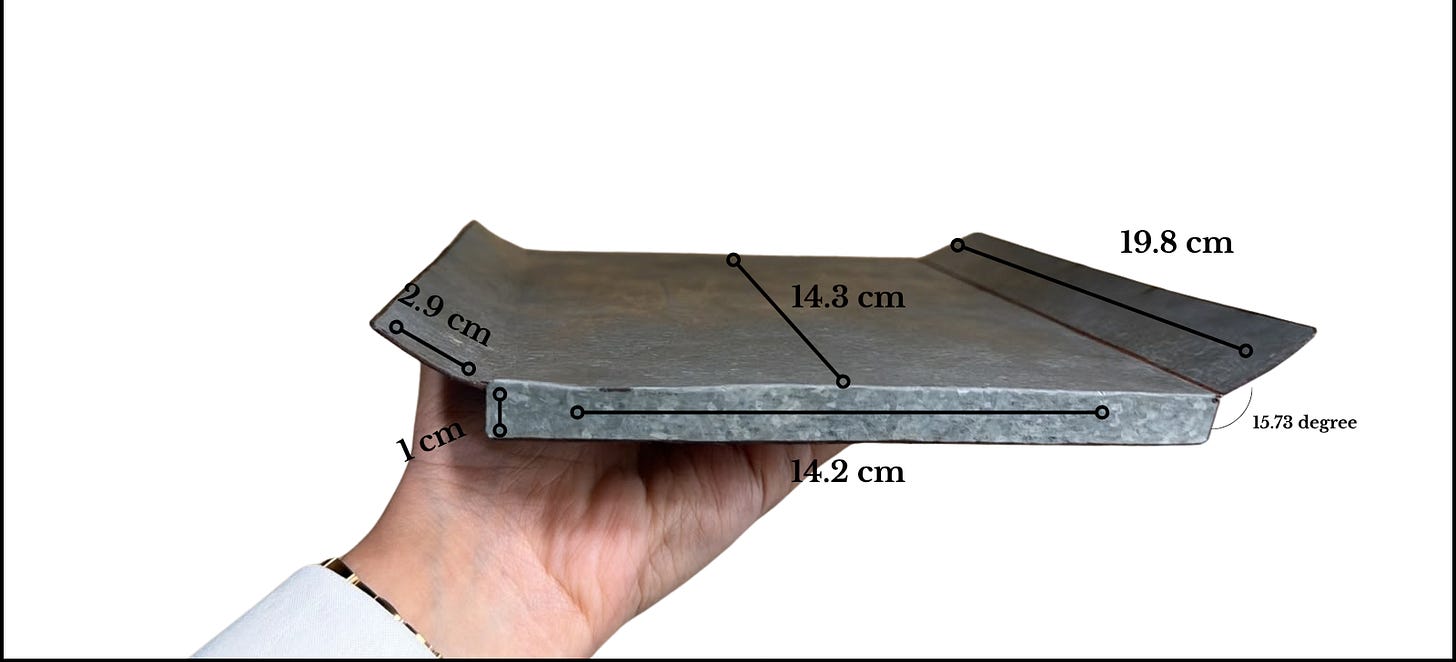
Our wedge is made from stainless steel and positioned at approximately 25 degrees.
The idea behind the angled wedge is simple: it allows the robot to get underneath the opposing robot and gain a mechanical advantage when pushing.
The wedge used in this build measures approximately 24 × 9 cm.
When designing your own wedge, make sure the final dimensions and construction comply with the official competition rules.
Step 3: Selecting the Battery
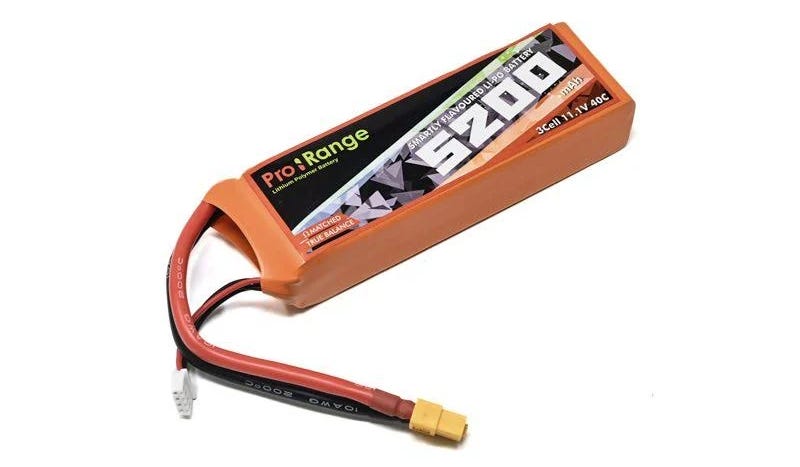
For this build, we are using a 3S LiPo battery.
A LiPo battery can deliver a large amount of current over a short period, which makes it suitable for applications where motors may experience high current demands.
The battery will act as the main power source for the robot.
You will also need a compatible LiPo battery charger to safely charge the battery.
Important Battery Safety
LiPo batteries require careful handling. Always use a compatible charger, inspect the battery before use, and follow appropriate LiPo charging and storage practices.
Step 4: Installing the Motors
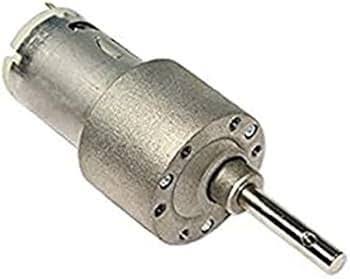
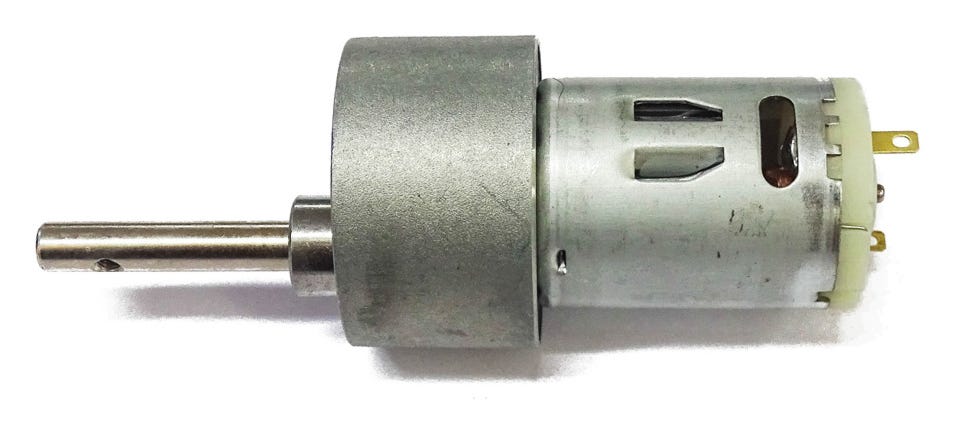
The robot uses two 300 RPM Johnson motors.
These motors are responsible for driving the two wheels and providing the torque required to push the opposing robot.
The motors are mounted onto the chassis using U-clamps and the designated mounting holes.
Once both motors are secured, the assembly should look similar to the reference design.
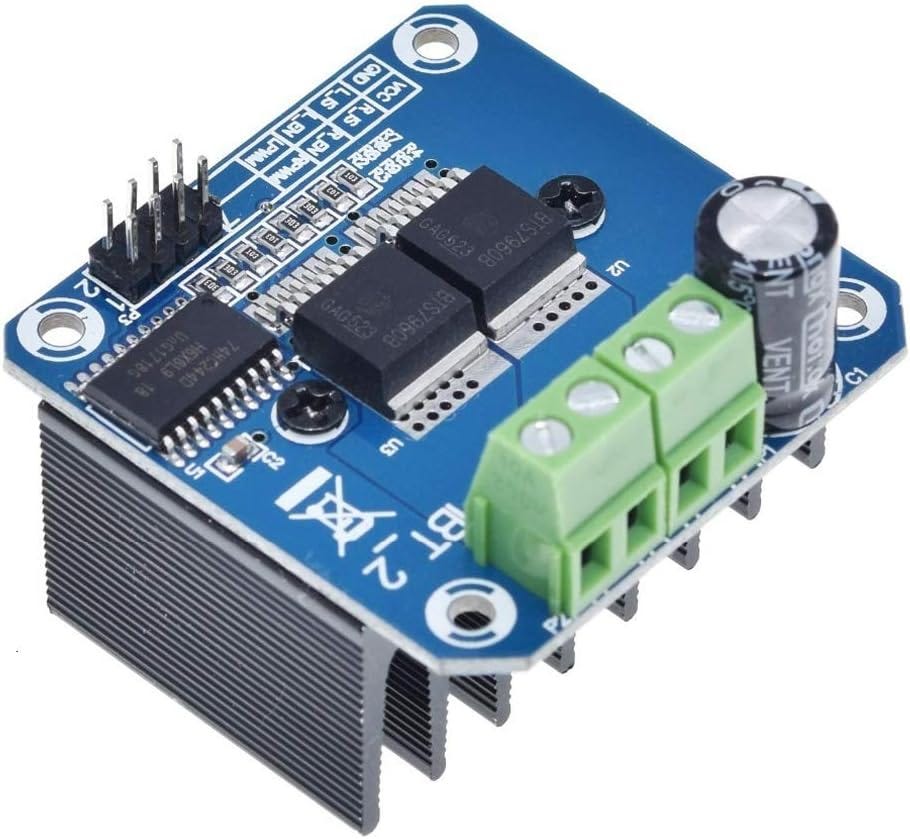
Step 5: Connecting the BTS7960 Motor Drivers
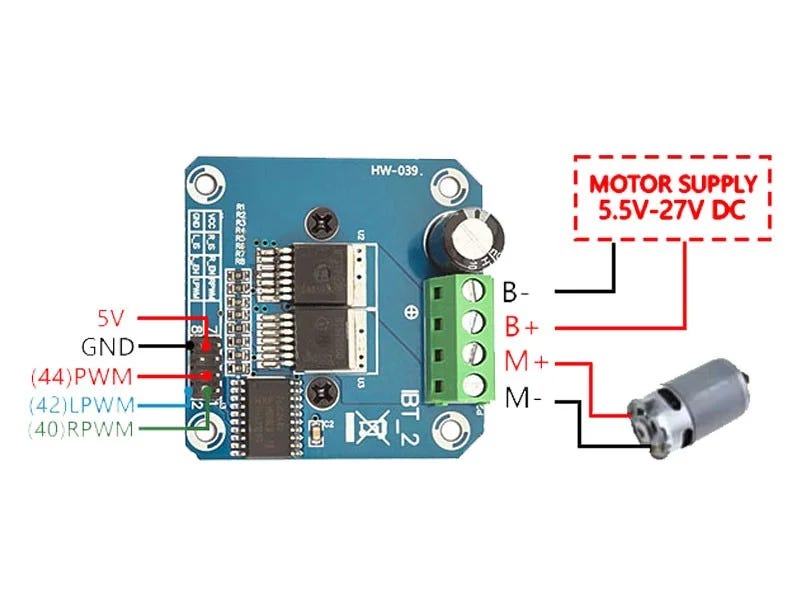
The two motors are controlled using two BTS7960 motor drivers.
Each motor driver is connected to a motor and allows the ESP32 to control the motor’s movement.
Before connecting the wires, identify the motor terminals on the BTS7960.
The connections used in this build are:
Black motor wire → M-
Red motor wire → M+
The same process is repeated for the second motor.
Step 6: Designing a Motor Driver Bracket
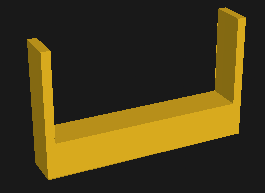
To securely mount the BTS7960 motor drivers, we designed a custom bracket using Autodesk Fusion.
The bracket was designed according to the dimensions measured from the motor driver and chassis.
Instead of using one large central clamp, two separate clamps were designed.
This makes installation easier because the motor driver’s terminals can interfere with a single-piece bracket.
The brackets can then be 3D printed and installed onto the chassis.
Don’t Have a 3D Printer?
That’s okay. For this particular build, the motor driver can alternatively be attached using strong double-sided tape, provided the mounting method is secure and appropriate for your application.
Step 7: Soldering the Motor Wires
Once the motors and motor drivers are positioned, it’s time to begin the electrical connections.
First, solder the wires onto the motors.
After soldering, connect the motor wires to the BTS7960 terminals:
Black → M-
Red → M+
Repeat the same process for the second motor.
Make sure the solder joints are secure and properly insulated before powering the system.
Step 8: Connecting the Battery
Next, we need to create the battery connection.
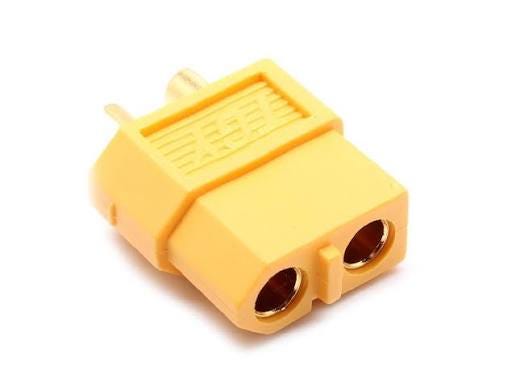
An XT60 connector is used to connect the LiPo battery to the robot’s electrical system.
Additional red and black wires are soldered to the battery connection to distribute power to the motor drivers and the step-down module.
Always double-check polarity before connecting the battery.
Step 9: Powering the ESP32
The next step is providing an appropriate power supply for the ESP32-S3 or ESP32-C3.
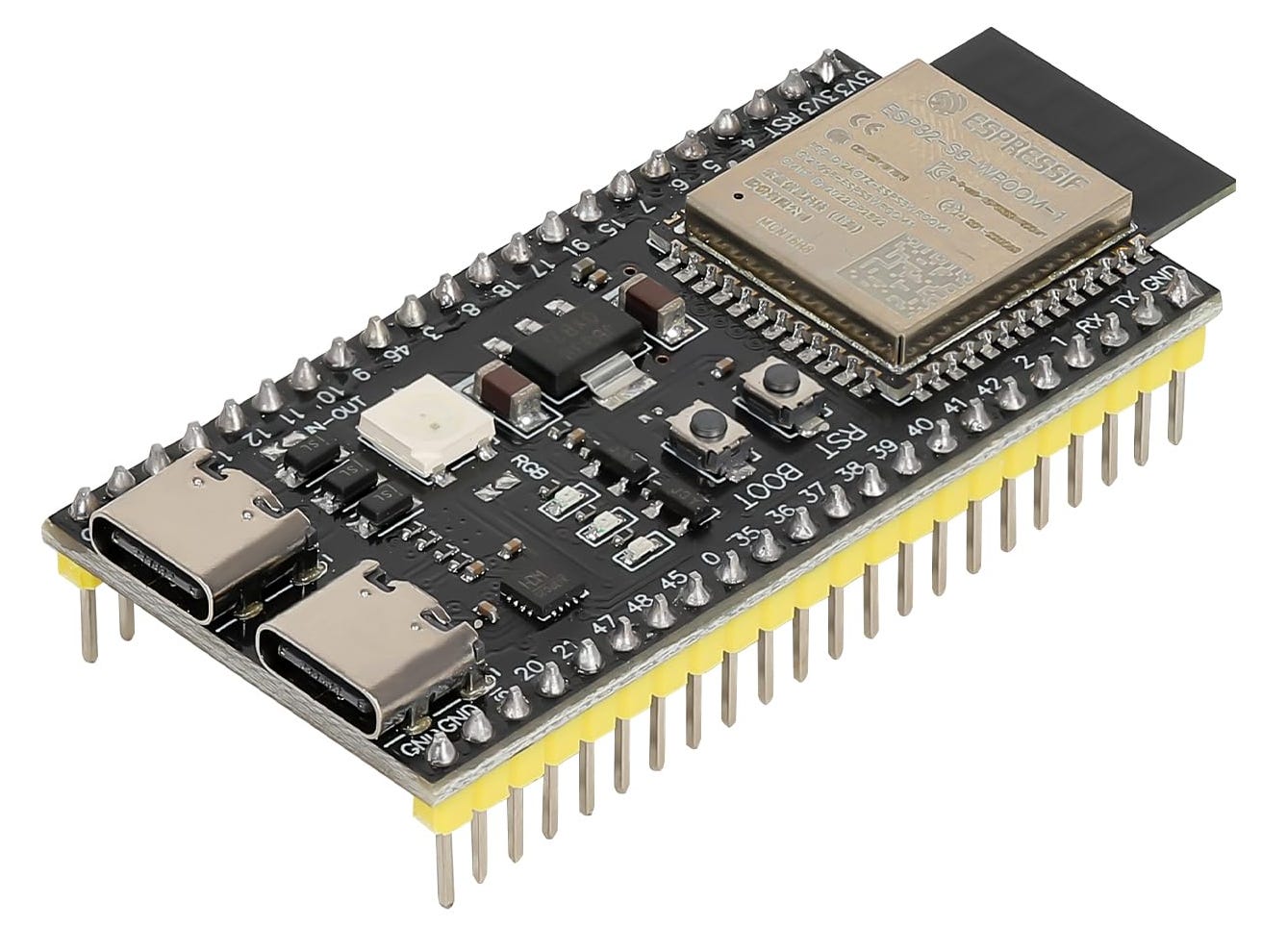
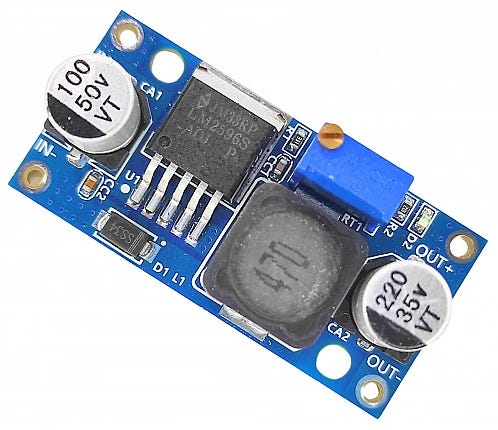
For this build, an LM2596 DC-DC step-down module is used to reduce the input voltage to the required output.
The LM2596 is powered from the battery connection through the appropriate wiring.
Additional wires are then connected to the positive and negative terminals of the LM2596.
Once all the soldering is complete, the output voltage of the step-down module needs to be checked before connecting it to the ESP32.
Step 10: Setting the LM2596 Output Voltage
Before connecting the ESP32, use a multimeter to check the output voltage from the LM2596.
Set your multimeter to the appropriate voltage measurement range and carefully measure the output using the probes.
For this build, the step-down module is adjusted to provide 5V output.
A capacitor is also used in the build to help reduce voltage fluctuations.
The build uses a 100 µF capacitor, with a 0.1 µF ceramic capacitor mentioned as another option.
Always verify the required voltage for your specific electronics before connecting them. Incorrect voltage can damage electronic components.
11. Complete RoboSumo Circuit Diagram
Once the chassis, motors, battery, motor drivers, and voltage regulator have been prepared, the next step is to connect the complete electronics system.
The RoboSumo robot uses the ESP32-S3 as the main control unit. The ESP32-S3 sends control signals to two BTS7960 motor drivers, with one driver controlling the left motor and the other controlling the right motor. The LiPo battery provides the main power, while the LM2596 step-down converter regulates the voltage required by the ESP32-S3 and logic connections.
Before moving on to programming, it is important to understand how these components are connected and how power and control signals flow through the system.
The following circuit diagram provides an overall wiring reference for the complete build.
Complete ESP32-S3 RoboSumo Wiring Diagram
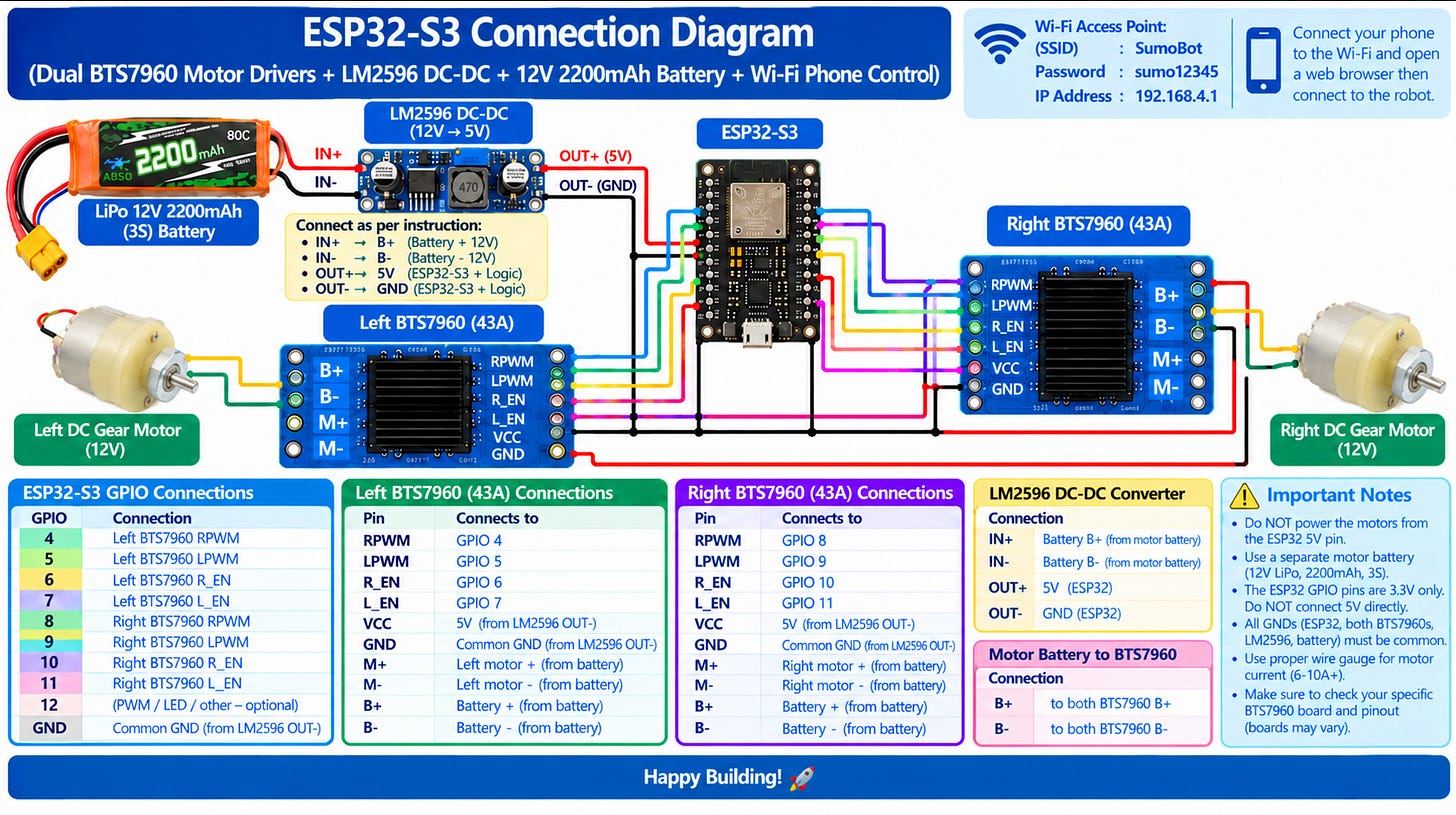
Figure: Complete ESP32-S3 connection diagram showing the LiPo battery, LM2596 DC-DC converter, dual BTS7960 motor drivers, DC gear motors and Wi-Fi phone-control connections.
Understanding the Circuit
The circuit can be understood as three main sections:
1. Power System
The LiPo battery acts as the main power source for the robot. Its supply is used for the motor power connections, while the LM2596 DC-DC converter provides a regulated 5V output for the ESP32-S3 and logic-side connections.
2. Motor Control System
Two BTS7960 motor drivers are used in the build. The left BTS7960 controls the left motor, while the right BTS7960 controls the right motor. The ESP32-S3 sends PWM and enable signals to these drivers to control motor direction and speed.
3. Control System
The ESP32-S3 receives the control input and processes it to determine how the left and right motors should move. In this build, the ESP32-S3 also supports Wi-Fi-based phone control.
ESP32-S3 GPIO Connections
The GPIO connections used in this build are:
ESP32-S3 GPIO Connection
GPIO 4 - Left BTS7960 RPWM
GPIO 5 - Left BTS7960 LPWM
GPIO 6 - Left BTS7960 R_EN
GPIO 7 - Left BTS7960 L_EN
GPIO 8 - Right BTS7960 RPWM
GPIO 9 - Right BTS7960 LPWM
GPIO 10 - Right BTS7960 R_EN
GPIO 11 - Right BTS7960 L_EN
The GND connections are shared between the ESP32-S3, LM2596 and BTS7960 logic connections, as shown in the diagram.
Important: The diagram is a reference for this specific build. Before powering the robot, carefully verify the polarity, voltage, grounding and pin connections against the exact components being used. Do not connect the motor supply directly to the ESP32-S3.
From Circuit to Code
Once the wiring has been completed and checked, the next step is to program the ESP32-S3.
The code determines how the ESP32-S3 communicates with the BTS7960 motor drivers and translates the control input into movement of the left and right motors. The following section explains the ESP32-S3 programming, including the required libraries, GPIO configuration, motor-control logic, Wi-Fi phone control and safety/failsafe functions.
Step 12: Wiring the Motor Drivers to the ESP32
Now comes the final stage of the electronics wiring.
The BTS7960 motor drivers need to be connected to the ESP32.
The control connections used in the build include:
RPWM
R-Enable
LPWM
L-Enable
VCC
GND
You can either solder the wires directly to the ESP32 or use jumper wires.
For this build, jumper wires are used because they make the connections easier to modify during testing. Once the connections are complete, carefully inspect the entire circuit before applying power.
Step 13: Wiring the BTS7960 to the ESP32
The BTS7960 motor drivers are connected to the ESP32 using the designated control pins.
The code uses the following pin configuration:
#define L_RPWM 4
#define L_LPWM 5
#define L_R_EN 6
#define L_L_EN 7
#define R_RPWM 15
#define R_LPWM 16
#define R_R_EN 17
#define R_L_EN 18
The source also defines GPIO 8 and GPIO 9 for the FlySky receiver’s CH1 and CH2 inputs. Line_Wise_Code_Explanation
You can either solder the wires directly to the ESP32 or use jumper wires. For this build, jumper wires are used because they are easier to work with.
Step 14: ESP32 Programming
The ESP32 acts as the main control unit of the RoboSumo robot.
The program handles:
Motor control
BTS7960 drivers
Wi-Fi communication
Browser-based joystick control
FlySky RC control
RC failsafe
Wi-Fi failsafe
Motor stopping
The source code uses the ESP32 Wi-Fi and web-server libraries:
#include <WiFi.h>
#include <WebServer.h>
The Wi-Fi library allows the ESP32 to create its own access point, while the WebServer library allows it to host the control webpage and receive commands from a phone. Line_Wise_Code_Explanation
ESP32 Wi-Fi Configuration
The robot creates its own Wi-Fi network using the following configuration:
const char* AP_SSID = “SumoBot”;
const char* AP_PASSWORD = “sumo12345”;
The program also includes failsafe settings:
const int RC_FAILSAFE_MS = 300;
const int WIFI_FAILSAFE_MS = 500;
const int PWM_FREQ = 20000;
const int PWM_RES_BITS = 8;
const int MOTOR_MAX = 255;
These settings define the Wi-Fi credentials, RC and Wi-Fi timeout periods, PWM frequency, PWM resolution, and maximum motor command. Line_Wise_Code_Explanation
How the Motor Control Works
The robot uses differential drive.
The program calculates separate commands for the left and right motors:
int left = throttle + steering;
int right = throttle - steering;
left = constrain(left, -MOTOR_MAX, MOTOR_MAX);
right = constrain(right, -MOTOR_MAX, MOTOR_MAX);
The calculated values are then sent to the two BTS7960 motor drivers:
driveMotor(L_RPWM, L_LPWM, left);
driveMotor(R_RPWM, R_LPWM, right);
In simple terms, throttle controls forward and reverse movement, while steering changes the speed difference between the two sides, allowing the robot to turn. Line_Wise_Code_Explanation
Phone-Based RoboSumo Control
The ESP32 also contains a complete HTML control webpage.
The webpage provides a joystick interface that allows the user to control the robot from a phone or laptop.
The joystick converts the user’s movement into throttle and steering values, which are then sent to the ESP32 using an HTTP command:
/cmd?t=...&s=...
The webpage also includes a STOP button that sends zero throttle and steering commands to stop the robot. Line_Wise_Code_Explanation
Connecting to the RoboSumo Robot
Once the code has been uploaded to the ESP32, connect your phone or laptop to the robot’s Wi-Fi network.
Search for:
SumoBot
Password:
sumo12345
Once connected, open a browser and enter:
192.168.4.1
The ESP32 serves the control webpage at this address. Line_Wise_Code_Explanation
The control interface provides:
Forward
Backward
Left
Right
Stop
FlySky RC Control
The uploaded source code also includes support for a FlySky CT6B transmitter.
The ESP32 measures the RC pulse widths from CH1 and CH2 using interrupt functions.
The code expects RC pulse values between approximately 1000 and 2000 microseconds, with 1500 microseconds representing the center position. Line_Wise_Code_Explanation
The RC system also has a takeover deadband. When the RC sticks move sufficiently away from their center position, RC control takes priority over phone control. Line_Wise_Code_Explanation
Safety and Failsafe System
Safety is an important part of the control program.
The code checks whether the RC signal is still valid and whether a recent phone command has been received.
The RC failsafe is set to 300 milliseconds, while the Wi-Fi control failsafe is set to 500 milliseconds. Line_Wise_Code_Explanation
If RC control is active, it takes priority.
If RC isn’t active but a recent phone command is available, phone control is used.
If neither controller is valid, the program automatically stops the motors:
stopMotors();
This provides a final safety state when there is no valid control input. Line_Wise_Code_Explanation
ESP32 Program Flow
The overall program works in the following sequence:
The ESP32 starts and initializes the motor drivers.
The RC interrupt system begins measuring FlySky CH1 and CH2.
The ESP32 creates the SumoBot Wi-Fi network.
The web server starts.
A phone connects to 192.168.4.1.
The phone receives the joystick control webpage.
Joystick movement is converted into throttle and steering values.
The browser sends the commands to the ESP32.
The ESP32 checks whether RC control is active.
If RC is active, RC commands the motors.
Otherwise, recent phone commands control the motors.
If neither controller is valid, the motors are stopped. Line_Wise_Code_Explanation
Access the Complete ESP32 Code
The code explained above is based on the uploaded RoboSumo ESP32 source-code documentation.
👉 Download the Complete ESP32 Code → https://drive.google.com/file/d/1ZIiiUKZYWj2SdlV-DkYzf6onR9YnWzV3/view?usp=drive_link
The complete project resources, including the code and STL files, can also be provided through the RoboSumo Resources section at the beginning of this guide.
Important: The uploaded code documentation includes both FlySky CT6B RC control and phone/Wi-Fi control. It is not a phone-only version. The documentation specifically notes that removing the RC sections would require modifying the source code. Line_Wise_Code_Explanation
Step 15: Final Testing
Before performing the final test run, carefully check every connection.
Check:
Motor connections
BTS7960 connections
Battery polarity
LM2596 output voltage
ESP32 connections
Jumper wires
Solder joints
Heat-shrink insulation
Motor mounting
Wheel alignment
Once everything has been checked, power on the robot and test each movement individually:
Forward → Backward → Left → Right
Make sure both motors respond correctly and that the robot moves in the intended direction.
Step 16: Check the Robot’s Weight
Before taking the robot to a competition, weigh the completed robot.
For the build described in this guide, the target is to ensure that the robot does not exceed 3 kg.
Always check the latest official competition rules before finalising your competition robot.
The RoboSumo Robot Is Ready!
The major stages of the build are now complete:
Design → Chassis → Motors → Motor Drivers → Battery → Wiring → ESP32 → Programming → Testing
Building a RoboSumo robot isn’t just about assembling components. It combines mechanical design, electronics, programming, problem-solving, and testing into one project.
Once the basic robot is working, students can experiment with their own designs while ensuring that the final robot remains within the official competition rules.
Want to Participate in OLL × TechFest?
Students planning to participate in the OLL × TechFest Robotics Championship 2026–27 can use this guide as a starting point for understanding the RoboSumo build process.
The championship features three tracks:
🤖 RoboSumo
Build and compete with a robot in a 1v1 robot battle.
🏎️ RoboRacer
Put your robot’s speed and control to the test.
💡 Robotics Innovation Challenge
Create a robotic or automated solution to a real-world problem.
The championship is for school students from Grades 4–12, with the Grand Finale at IIT Bombay.
Participation is FREE.
👉 Competition Details: https://oll.co/techfest
Final Words
Building a competition robot is a process of testing, learning, improving, and trying again.
The first version may not be perfect. There may be wiring issues, programming errors, motor problems, or mechanical challenges. Each of these becomes an opportunity to understand the robot better.
For students preparing for RoboSumo, the goal isn’t just to build a robot that moves. It’s to understand why it moves, how its systems work together, and how the design can be improved. If you build your own RoboSumo robot using this guide, share your experience and questions in the comments.
See you at OLL × TechFest!
Build. Battle. Race. Innovate. 🤖